SIM-ON8 min read
Digital Twin in Commercial Real Estate: When a Building Finally Starts to “Talk”
Managing a commercial property - an office, hotel, warehouse, or large service facility - often looks the same everywhere. Documents are scattered across different folders. Device data lives in separate systems. Maintenance requests come in from multiple channels. And when something needs to be checked quickly, the search begins: who installed it, where it is, what its number is, when it was last serviced, and whether anyone documented it at all. SIM-ON positions its solution as a way to bring order to that chaos by combining building management, asset management, and automation in one 3D environment.
This is where the digital twin comes in. In simple terms, a digital twin is a digital version of a real building. It is not just a nice-looking 3D model. It is a place where you can see the space, the equipment, the documents, the maintenance tasks, and the data coming from building systems. SIM-ON describes this as a platform that combines IoT control, Asset Management, and Facility Management in one interface. In other words, instead of jumping between apps, people work in one place.
In this article, I will show what kinds of problems a digital twin solves in commercial real estate, and then move to a specific example: how SIM-ON puts this idea into practice and which roles in a Real Estate organization may be most interested in this kind of solution.
The biggest problem is not that “the building is too big”
The biggest problem is that information about the building is scattered
In theory, managing a building should be simple. There is a property, there are systems, there are devices, and there are people responsible for keeping everything running. In practice, every part tends to live separately. Documentation is in PDFs. Photos are in emails. Repair history is in another system. Smart devices often have their own dedicated apps. SIM-ON says this clearly on its property managers page, pointing to problems like “paperwork and outdated systems” that make everyday work harder.
This is exactly where a digital twin starts to make sense. Instead of asking, “Which folder is it in?”, you can open the digital version of the building and see everything in the context of the actual space. That word matters: context. It means not just “what,” but also where, what it is connected to, and what has happened to it before. SIM-ON highlights a 3D-driven interface, centralized building data, and easy access to asset information inside a 3D space.
What really causes pain for commercial property teams
1. “We can never find what we need when we actually need it”
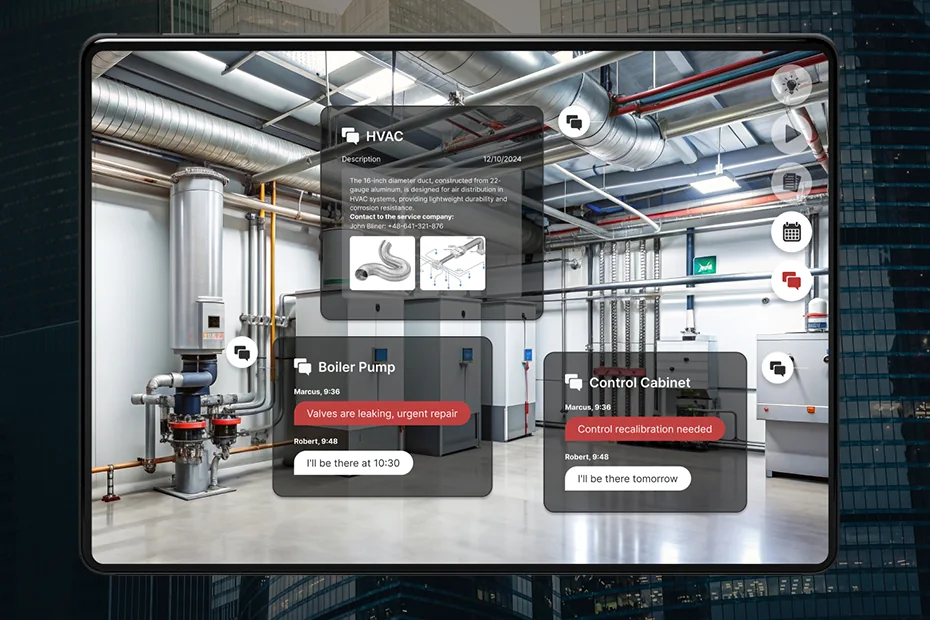
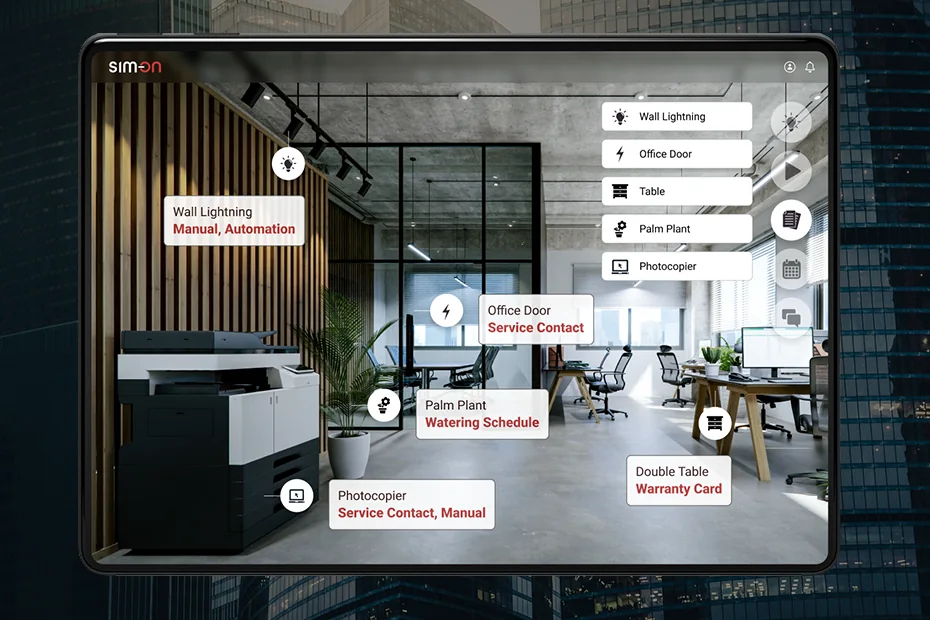
This is one of the most expensive problems, even if it does not always show up clearly in a spreadsheet. When documentation, photos, manuals, and service history are scattered, the team wastes time not on solving the problem, but on finding the information first. SIM-ON describes Asset Management as a secure repository for building data that is easy to access in 3D space, and on its homepage it also talks about “one data container” for building assets.
2. “We know something is wrong, but we do not know exactly where”
This is a very common situation. Someone reports a problem, but the report is vague. Without an exact location and without linking the issue to a specific device, response time gets longer. SIM-ON describes its ticket system as a tool for reporting and handling issues connected to specific locations or assets inside Matterport scans. That matters because the issue stops being just a text description and becomes a problem “pinned” to an actual place.
3. “Every system works separately”
In many commercial buildings, devices and installations do not come from just one vendor. That means multiple dashboards, multiple logins, and a lot of switching between tools. SIM-ON explains this very clearly: the idea is to create one central hub for equipment from different vendors and connect multi-standard IoT ecosystems. IoT simply means devices that send data and can be controlled digitally - for example sensors, meters, automation components, or comfort systems in a building.
4. “Too much time goes into coordination instead of action”
On its property managers page, SIM-ON emphasizes simplified daily operations, live updates, better visibility into building status, and easier collaboration with tenants, vendors, and teams. This matters because in commercial real estate, fixing an issue is only part of the job. The other part is communication: who reported it, who checked it, who approved it, who has access, and who is responsible for what.
5. “We have tasks, but we do not have one clear history of the building”
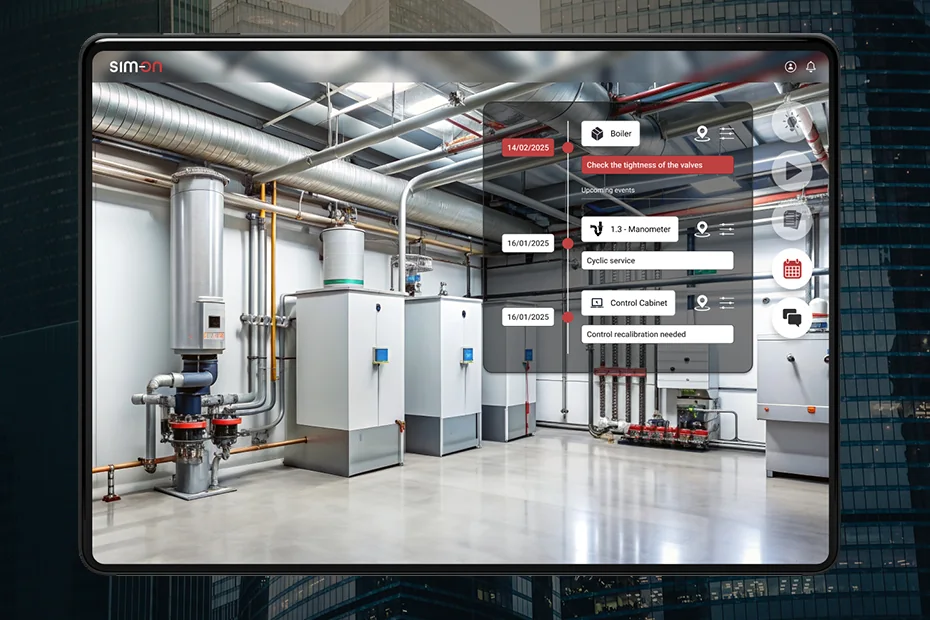
SIM-ON’s Facility Management section includes an Event Timeline. That may sound technical, but the idea is simple: a building has a history, and it helps when that history is visible. On the timeline, teams can track important events such as service schedules, equipment updates, and operational activities. That makes it easier to understand what happened before, what is happening now, and what is planned next.
What SIM-ON actually does - and why it is more than just “a nice 3D model”
In the simplest terms, SIM-ON does not present itself as a basic building visualization tool. It presents itself as a platform for day-to-day operations. On its homepage, it highlights three areas: Facility Management, Asset Management, and Building Automation. That means:
- managing maintenance work and tasks,
- managing assets,
- managing building automation.
Facility Management
This is the layer responsible for daily building operations. SIM-ON talks about scheduling and supervising maintenance tasks, 3D inspections, event timelines, and issue reporting through a task manager. It also includes a ticket system and user roles that help control access to data and tools.
Asset Management
An asset is simply an important item in the building that you want to keep track of. In SIM-ON documentation, an asset is explained as an object or item you want to manage in your space. It differs from a “device” because it does not need to have smart connectivity. That matters because not everything in a building is “smart,” but it can still be worth documenting, photographing, linking to files, and assigning to a location.
Building Automation
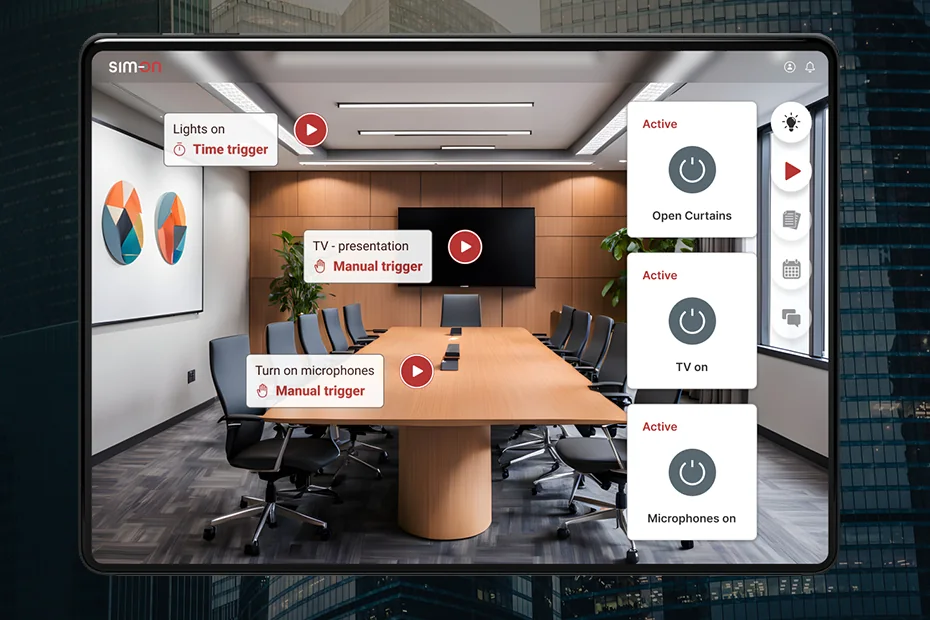
This area is tied to automation and IoT. SIM-ON talks about centralizing different vendors, monitoring energy consumption, visualizing device activity, and mapping devices precisely in space. On the Building Automation side, there is also a very practical point: devices are visible in the 3D model where they actually are, which makes diagnosis and maintenance easier.
What this looks like in real life
SIM-ON’s site includes specific use cases. On the property owners page, it describes the KDW law office, which, according to the page, uses SIM-ON every day in a 125 m² office. The example mentions integration with a FIBARO-based system and full asset management tied to devices and interior furnishings. It is a good example showing that a digital twin can be used not just to “look at the building,” but to work with its data and equipment every day.
On the IoT installers page, there is also an example of a hotel boiler room. SIM-ON describes centralized management of smart devices, guest comfort systems, and environmental monitoring. In simple terms, different technical parts of a building can be brought into one clear view, making it easier to notice a problem faster and respond faster.
Which roles in a Real Estate organization may care about SIM-ON
Property Owner
This is the owner or investor who wants to see the bigger picture: what is happening in the building, where money is being lost, whether data is under control, and whether the team is working efficiently. The property owners page emphasizes better visibility, cost savings, communication, and access to property data.
Property Manager
This is the person coordinating daily activity around the building. For them, what matters is less paperwork, live updates, easier collaboration, better cost control, and faster decision-making. These are the exact problems and value points highlighted on SIM-ON’s property managers page.
Facility Manager
This is the person closest to the building’s daily operations. They care about tasks, inspections, events, service history, equipment condition, and fast responses. The facility managers page talks about task centralization, real-time monitoring, maintenance scheduling, and coordination between teams.
Technical Team / Integrator / IoT Installer
These are the people who implement, connect, and maintain technical systems. What matters to them is one working environment, easier troubleshooting, real-time monitoring, and less chaos when dealing with multiple vendors. That is exactly the language used on the IoT installers page.
How to get started without turning it into a giant revolution
SIM-ON presents onboarding as a fairly simple process. First, you create the space using a Matterport scan or another setup method, then you add the space to your account, and then you connect data, devices, and assets. The documentation also shows that you can import rooms and work with supported providers such as KNX, SmartThings, NICE (Fibaro), and NETx. This matters because implementation does not have to begin with digitizing everything all at once. You can start with one building and one problem - for example maintenance tickets or organizing asset data.
Conclusion
The biggest problem in commercial real estate today is not a lack of data. The problem is that the data is scattered, disconnected from the physical space, and hard to use in everyday work. A digital twin helps organize that mess by turning the building into a clear working environment - one where people can see the space, check an asset, find a document, report a problem, and track the history of actions. SIM-ON presents this idea in a very practical way: as a combination of 3D, building data, automation, and maintenance processes in one tool.
That is why a digital twin is no longer just an interesting piece of technology. In a well-designed implementation, it becomes simply an easier way to manage a complex building.